MainActivity2.java
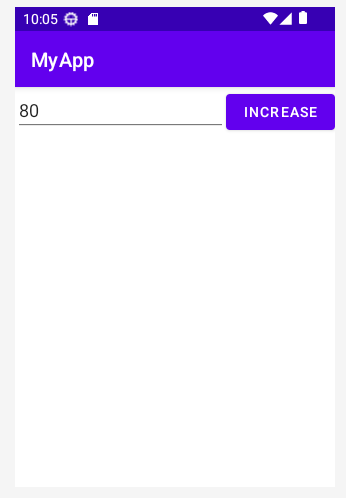
public class MainActivity2 extends AppCompatActivity {
    EditText et;
    Button btn;
    @Override
    protected void onCreate(Bundle savedInstanceState) {
        super.onCreate(savedInstanceState);
        setContentView(R.layout.activity_main2);

        et = findViewById(R.id.et_mine);
        btn = findViewById(R.id.btn);
        btn.setOnClickListener(new View.OnClickListener() {
            @Override
            public void onClick(View view) {
                myclick();
            }
        });
    }

    public void myclick(){
        String a = et.getText()+"";
        int count = Integer.parseInt(a);
        count += 10;
        et.setText(count+"");
        Log.d("값",count+"");
    }


}
activity_main2.xml
<?xml version="1.0" encoding="utf-8"?>
<androidx.constraintlayout.widget.ConstraintLayout xmlns:android="http://schemas.android.com/apk/res/android"
    xmlns:app="http://schemas.android.com/apk/res-auto"
    xmlns:tools="http://schemas.android.com/tools"
    android:layout_width="match_parent"
    android:layout_height="match_parent"
    tools:context=".MainActivity">

    <LinearLayout
        android:layout_width="match_parent"
        android:layout_height="match_parent"
        android:orientation="vertical">

        <LinearLayout
            android:layout_width="match_parent"
            android:layout_height="match_parent"
            android:orientation="horizontal">

            <EditText
                android:id="@+id/et_mine"
                android:layout_width="wrap_content"
                android:layout_height="wrap_content"
                android:layout_weight="1"
                android:ems="10"
                android:text="50"
                android:inputType="number" />

            <Button
                android:id="@+id/btn"
                android:layout_width="wrap_content"
                android:layout_height="wrap_content"
                android:layout_weight="1"
                android:text="INCREASE" />

        </LinearLayout>
    </LinearLayout>

</androidx.constraintlayout.widget.ConstraintLayout>
'AndroidStudio' 카테고리의 다른 글
| [Android Studio] 구구단 출력하기 (0) | 2023.06.28 |
|---|---|
| [Android Studio] 홀 짝 게임 만들기 (0) | 2023.06.28 |
| [Android Studio] 로또 생성하기 (0) | 2023.06.28 |
| [Android Studio] A부터 B까지 합 C 구하기 (0) | 2023.06.27 |
| [Android Studio] 버튼 onClick 기초 (0) | 2023.06.27 |


