MainActivity7.java
package kr.co.aiai.app;

import android.os.Bundle;
import android.view.View;
import android.widget.Button;
import android.widget.EditText;
import android.widget.TextView;

import androidx.appcompat.app.AppCompatActivity;

public class MainActivity7 extends AppCompatActivity {
    EditText et_first;
    EditText et_last;
    TextView tv;
    @Override
    protected void onCreate(Bundle savedInstanceState) {
        super.onCreate(savedInstanceState);
        setContentView(R.layout.activity_main7);

        et_first = findViewById(R.id.et_first);
        et_last = findViewById(R.id.et_last);
        tv = findViewById(R.id.tv);
        Button btn = findViewById(R.id.btn);
        btn.setOnClickListener(new View.OnClickListener() {
            @Override
            public void onClick(View view) {
                myclick();
            }
        });
    }

    public void myclick(){
        String a = et_first.getText()+"";
        int aa = Integer.parseInt(a);
        String b = et_last.getText().toString();
        int bb = Integer.parseInt(b);
        String txt = "";
        /*
        for (int i=aa; i<=bb; i++){
            for(int j=1; j<=i; j++){
                txt += "*";
            }
            txt += "\n";
        }
        tv.setText(txt);*/

        for(int i = aa; i<=bb; i++){
            txt += getStar(i);
        }
        tv.setText(txt);
    }

    public String getStar(int cnt){
        String res = "";
        for(int i = 0; i <cnt; i++){
            res += "*";
        }
        res += "\n";
        return res;
    }


}
처음엔 중첩 for문을 사용해 별을 찍었지만, 별을 찍는 getStar(int cnt) 메서드를 만들어 파라미터 값에 대해 for문을 돌리니 훨씬 쉽고 간편했다.
activity_main7.xml
<?xml version="1.0" encoding="utf-8"?>
<androidx.constraintlayout.widget.ConstraintLayout xmlns:android="http://schemas.android.com/apk/res/android"
    xmlns:app="http://schemas.android.com/apk/res-auto"
    xmlns:tools="http://schemas.android.com/tools"
    android:layout_width="match_parent"
    android:layout_height="match_parent"
    tools:context=".MainActivity">

    <LinearLayout
        android:layout_width="match_parent"
        android:layout_height="match_parent"
        android:orientation="vertical">

        <LinearLayout
            android:layout_width="match_parent"
            android:layout_height="wrap_content"
            android:orientation="horizontal">

            <TextView

                android:layout_width="wrap_content"
                android:layout_height="wrap_content"
                android:text="첫 별 수 : "
                android:textSize="25dp" />

            <EditText
                android:id="@+id/et_first"
                android:layout_width="280dp"
                android:layout_height="wrap_content"
                android:ems="10"
                android:inputType="number" />
        </LinearLayout>

        <LinearLayout
            android:layout_width="match_parent"
            android:layout_height="wrap_content"
            android:orientation="horizontal">

            <TextView

                android:layout_width="wrap_content"
                android:layout_height="wrap_content"
                android:text="끝 별 수 : "
                android:textSize="25dp" />

            <EditText
                android:id="@+id/et_last"
                android:layout_width="280dp"
                android:layout_height="wrap_content"
                android:ems="10"
                android:inputType="number" />
        </LinearLayout>

        <LinearLayout
            android:layout_width="match_parent"
            android:layout_height="wrap_content"

            android:orientation="horizontal">

            <Button
                android:id="@+id/btn"
                android:layout_width="match_parent"
                android:layout_height="match_parent"
                android:text="출력하기" />

        </LinearLayout>

        <TextView
            android:id="@+id/tv"
            android:layout_width="match_parent"
            android:layout_height="match_parent" />


    </LinearLayout>

</androidx.constraintlayout.widget.ConstraintLayout>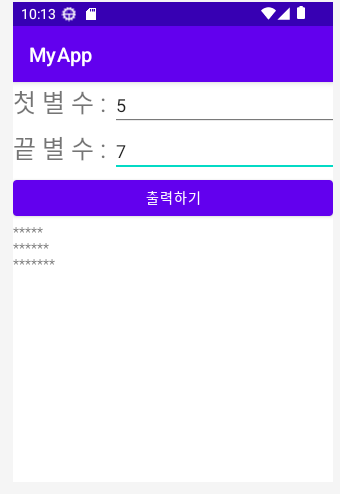
'AndroidStudio' 카테고리의 다른 글
| [Android Studio] strike 게임 만들기 (0) | 2023.06.28 |
|---|---|
| [Android Studio] 전화기 만들기 (0) | 2023.06.28 |
| [Android Studio] 구구단 출력하기 (0) | 2023.06.28 |
| [Android Studio] 홀 짝 게임 만들기 (0) | 2023.06.28 |
| [Android Studio] 로또 생성하기 (0) | 2023.06.28 |


