myqt05.ui
<?xml version="1.0" encoding="UTF-8"?>
<ui version="4.0">
 <class>MainWindow</class>
 <widget class="QMainWindow" name="MainWindow">
  <property name="geometry">
   <rect>
    <x>0</x>
    <y>0</y>
    <width>800</width>
    <height>600</height>
   </rect>
  </property>
  <property name="windowTitle">
   <string>MainWindow</string>
  </property>
  <widget class="QWidget" name="centralwidget">
   <widget class="QLineEdit" name="le">
    <property name="geometry">
     <rect>
      <x>40</x>
      <y>20</y>
      <width>231</width>
      <height>31</height>
     </rect>
    </property>
   </widget>
   <widget class="QPushButton" name="pb1">
    <property name="geometry">
     <rect>
      <x>40</x>
      <y>60</y>
      <width>75</width>
      <height>71</height>
     </rect>
    </property>
    <property name="text">
     <string>1</string>
    </property>
   </widget>
   <widget class="QPushButton" name="pb2">
    <property name="geometry">
     <rect>
      <x>120</x>
      <y>60</y>
      <width>75</width>
      <height>71</height>
     </rect>
    </property>
    <property name="text">
     <string>2</string>
    </property>
   </widget>
   <widget class="QPushButton" name="pb3">
    <property name="geometry">
     <rect>
      <x>200</x>
      <y>60</y>
      <width>75</width>
      <height>71</height>
     </rect>
    </property>
    <property name="text">
     <string>3</string>
    </property>
   </widget>
   <widget class="QPushButton" name="pb4">
    <property name="geometry">
     <rect>
      <x>40</x>
      <y>140</y>
      <width>75</width>
      <height>71</height>
     </rect>
    </property>
    <property name="text">
     <string>4</string>
    </property>
   </widget>
   <widget class="QPushButton" name="pb6">
    <property name="geometry">
     <rect>
      <x>200</x>
      <y>140</y>
      <width>75</width>
      <height>71</height>
     </rect>
    </property>
    <property name="text">
     <string>6</string>
    </property>
   </widget>
   <widget class="QPushButton" name="pb5">
    <property name="geometry">
     <rect>
      <x>120</x>
      <y>140</y>
      <width>75</width>
      <height>71</height>
     </rect>
    </property>
    <property name="text">
     <string>5</string>
    </property>
   </widget>
   <widget class="QPushButton" name="pb7">
    <property name="geometry">
     <rect>
      <x>40</x>
      <y>220</y>
      <width>75</width>
      <height>71</height>
     </rect>
    </property>
    <property name="text">
     <string>7</string>
    </property>
   </widget>
   <widget class="QPushButton" name="pb9">
    <property name="geometry">
     <rect>
      <x>200</x>
      <y>220</y>
      <width>75</width>
      <height>71</height>
     </rect>
    </property>
    <property name="text">
     <string>9</string>
    </property>
   </widget>
   <widget class="QPushButton" name="pb8">
    <property name="geometry">
     <rect>
      <x>120</x>
      <y>220</y>
      <width>75</width>
      <height>71</height>
     </rect>
    </property>
    <property name="text">
     <string>8</string>
    </property>
   </widget>
   <widget class="QPushButton" name="pb0">
    <property name="geometry">
     <rect>
      <x>40</x>
      <y>300</y>
      <width>75</width>
      <height>71</height>
     </rect>
    </property>
    <property name="text">
     <string>0</string>
    </property>
   </widget>
   <widget class="QPushButton" name="pb_call">
    <property name="geometry">
     <rect>
      <x>124</x>
      <y>300</y>
      <width>151</width>
      <height>71</height>
     </rect>
    </property>
    <property name="text">
     <string>CALL</string>
    </property>
   </widget>
  </widget>
  <widget class="QMenuBar" name="menubar">
   <property name="geometry">
    <rect>
     <x>0</x>
     <y>0</y>
     <width>800</width>
     <height>21</height>
    </rect>
   </property>
  </widget>
  <widget class="QStatusBar" name="statusbar"/>
 </widget>
 <resources/>
 <connections/>
</ui>
myqt05.py
import sys
from PyQt5 import uic
from PyQt5.QtWidgets import QApplication, QMainWindow
from PyQt5.Qt import QMessageBox

form_class = uic.loadUiType("myqt05.ui")[0]


class WindowClass(QMainWindow, form_class):
    def __init__(self):
        super().__init__()
        self.setupUi(self)
        self.pb0.clicked.connect(lambda: self.btnClick(self.pb0))
        self.pb1.clicked.connect(lambda: self.btnClick(self.pb1))
        self.pb2.clicked.connect(lambda: self.btnClick(self.pb2))
        self.pb3.clicked.connect(lambda: self.btnClick(self.pb3))
        self.pb4.clicked.connect(lambda: self.btnClick(self.pb4))
        self.pb5.clicked.connect(lambda: self.btnClick(self.pb5))
        self.pb6.clicked.connect(lambda: self.btnClick(self.pb6))
        self.pb7.clicked.connect(lambda: self.btnClick(self.pb7))
        self.pb8.clicked.connect(lambda: self.btnClick(self.pb8))
        self.pb9.clicked.connect(lambda: self.btnClick(self.pb9))

        # self.pb0.clicked.connect(partial(self.btnClick, self.pb0))
        # self.pb1.clicked.connect(partial(self.btnClick, self.pb1))
        # self.pb2.clicked.connect(partial(self.btnClick, self.pb2))
        # self.pb3.clicked.connect(partial(self.btnClick, self.pb3))
        # self.pb4.clicked.connect(partial(self.btnClick, self.pb4))
        # self.pb5.clicked.connect(partial(self.btnClick, self.pb5))
        # self.pb6.clicked.connect(partial(self.btnClick, self.pb6))
        # self.pb7.clicked.connect(partial(self.btnClick, self.pb7))
        # self.pb8.clicked.connect(partial(self.btnClick, self.pb8))
        # self.pb9.clicked.connect(partial(self.btnClick, self.pb9))

        self.pb_call.clicked.connect(self.callClick)

    def btnClick(self, button):
        b = button.text()
        str_old = self.le.text()
        str_new = b
        self.le.setText(str_old+str_new)

    def callClick(self):
        txt = self.le.text()
        QMessageBox.about(self,'Call','Calling...'+txt)


if __name__ == "__main__":
    app = QApplication(sys.argv)
    myWindow = WindowClass()
    myWindow.show()
    app.exec_()
람다 함수를 사용해 같은 함수에 다른 파라미터 값들을 주는 방법과, partitial() 메서드를 사용하는 방법 두 가지가 있음
실행화면
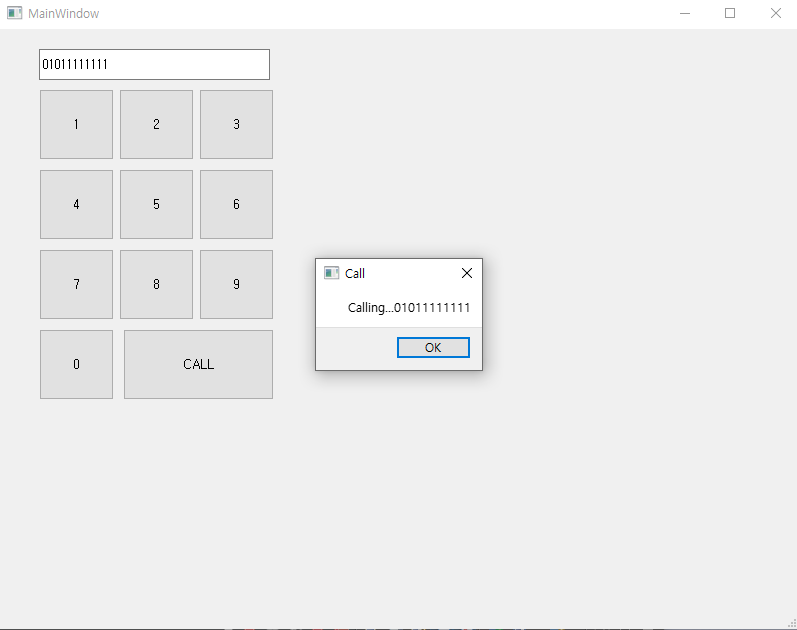
+++수정)
import sys
from PyQt5 import uic
from PyQt5.QtWidgets import QApplication, QMainWindow
from PyQt5.Qt import QMessageBox

form_class = uic.loadUiType("myqt05.ui")[0]


class WindowClass(QMainWindow, form_class):
    def __init__(self):
        super().__init__()
        self.setupUi(self)

        self.pb1.clicked.connect(self.myclick)
        self.pb2.clicked.connect(self.myclick)
        self.pb3.clicked.connect(self.myclick)
        self.pb4.clicked.connect(self.myclick)
        self.pb5.clicked.connect(self.myclick)
        self.pb6.clicked.connect(self.myclick)
        self.pb7.clicked.connect(self.myclick)
        self.pb8.clicked.connect(self.myclick)
        self.pb9.clicked.connect(self.myclick)
        self.pb0.clicked.connect(self.myclick)

        self.pb_call.clicked.connect(self.callClick)

    def myclick(self):
        # 버튼이 클릭되었을 때 수행할 동작을 작성합니다.
        clicked_button = self.sender()
        button_text = clicked_button.text()
        current_text = self.le.text()
        self.le.setText(current_text + button_text)

    def callClick(self):
        txt = self.le.text()
        QMessageBox.about(self,'Call','Calling...'+txt)


if __name__ == "__main__":
    app = QApplication(sys.argv)
    myWindow = WindowClass()
    myWindow.show()
    app.exec_()
sender() 라는 함수를 사용해 할 수 도 있다.
sender()는 this. 느낌으로 여러 버튼에 같은 함수를 지정해줘도 누른 해당 버튼을 나타낼 수 있다!!!
'Python' 카테고리의 다른 글
| [QT] 별찍기 (0) | 2023.06.29 |
|---|---|
| [QT] 가위바위보 게임 (0) | 2023.06.29 |
| [QT] 구구단 출력하기 (0) | 2023.06.28 |
| [QT] 로또 만들기 (0) | 2023.06.28 |
| [QT] 버튼 클릭 시 감소 (0) | 2023.06.28 |


