예외 처리
- 프로그램이 처리되는 동안 특정한 문제(에러)가 발생했을 때 처리를 중단하고 다른 처리를 하는 것(== 오류처리)
예외 처리 방법의 종류
1) try-catch
2) page 디렉티브
3) web.xml
4) 웹브라우저
위 순서대로 권한이 강하다 ==> 네 가지 예외처리를 동시에 한 경우, 1) try-catch 부터 우선 처리한다.
try-catch 예외처리
- 자바의 예외 처리 구문으로 스크립틀릿 태그에 작성한다.
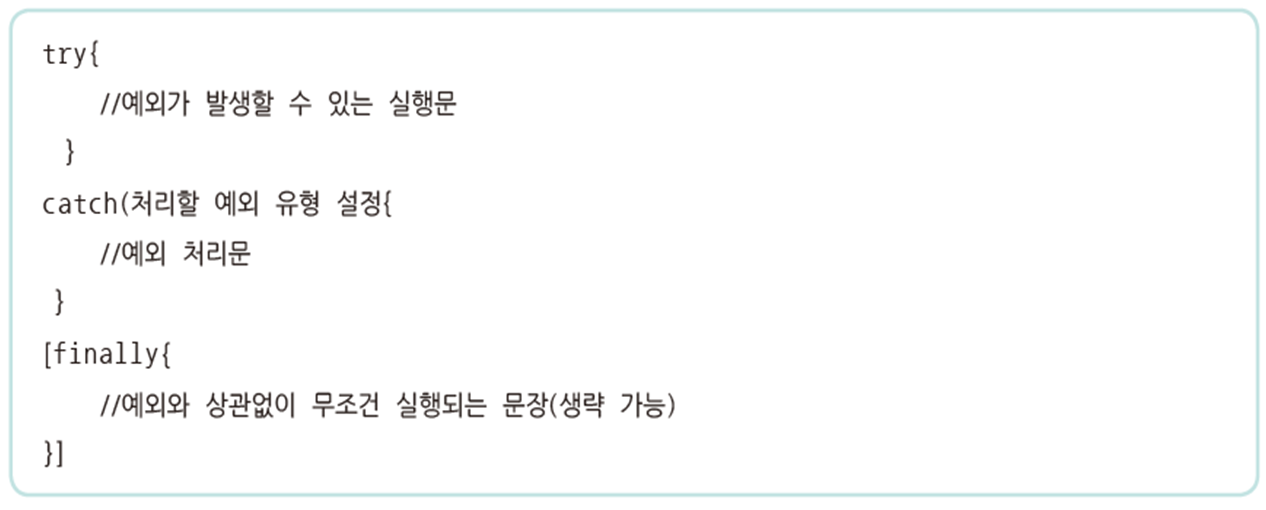
예시)
<%@ page language="java" contentType="text/html; charset=UTF-8"%>
<%-- <%@ page errorPage ="exception_error.jsp" %> --%>
<!DOCTYPE html>
<html>
<head>
<title>Exception</title>
</head>
<body>
	<%	//스크립틀릿
	/*  post방식
		요청URL : tryCatch_process.jsp
		요청파라미터 : {num1=12&num2=6n}	 */
		try{
			String num1 = request.getParameter("num1");	//"12"
			String num2 = request.getParameter("num2");	//"6"


			// 문자를 숫자로 형변환
			int a = Integer.parseInt(num1);	//12
			int b = Integer.parseInt(num2);	//6n <- 문제 발생
			int c = a / b ;
			out.print("<p>" + num1 + " / " + num2 + " = " + c+"</p>");
		}catch(NumberFormatException e){
			//오류 발생 시 tryCatch_error.jsp로 포워딩
			/*
				1) forwarding : jsp를 해석->컴파일->html리턴받음. 데이터를 전달할 수 있음
				2) redirect : URL을 재요청. 데이터를 전달하기 어려움
			*/
			//request객체와 response객체를 전달
			//tryCatch_error.jsp에서도 요청파라미터인 ?num1=12&num2=6n을 사용할 수 있게됨
			RequestDispatcher dispatcher =
				request.getRequestDispatcher("tryCatch_error.jsp");
			dispatcher.forward(request, response);
		}
	%>
</body>
</html>
page 디렉티브
1) errorPage 속성
- 오류가 날 시 이동할 페이지URL을 설정해준다.
- 오류 페이지는 단독으로 실행될 수 없다(오류발생함)

2) isErrorPage 속성
- 오류 발생 시 이동된 페이지에서 에러페이지임을 정의해주어야 내장객체인 exception객체를 사용할 수 있다.

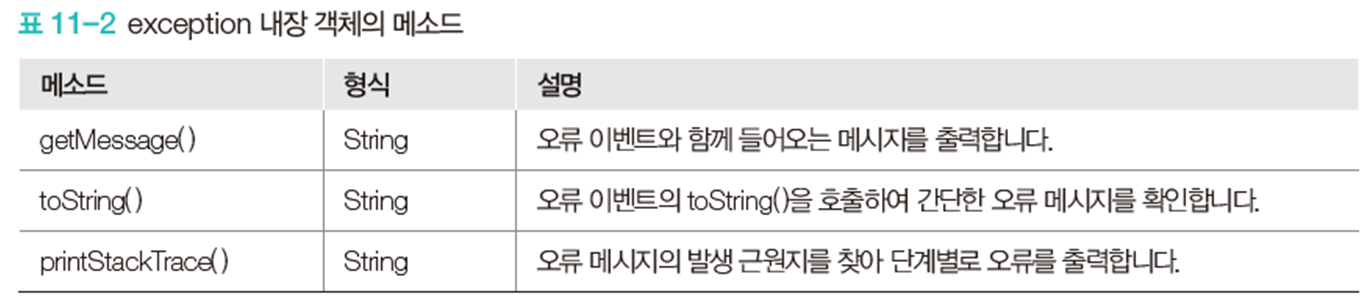
- exception 내장객체
<%@ page language="java" contentType="text/html; charset=UTF-8"%>
<%@ page errorPage="errorPage_error.jsp" %>
<!--
JSP 페이지가 실행되는 도중 오류 발생 시 오류 페이지 호출
-->
<!DOCTYPE html>
<html>
<head>
<title>Exception</title>
</head>
<body>
	<!-- errorPage.jsp?name=smith => SMITH
		 errorPage.jsp => 오류발생(null을 대문자변환 불가)
		 toUpperCase() 메서드 : 파라미터 값을 대문자로 변환하여 출력
	 -->
	name 파라미터 : <%=request.getParameter("name").toUpperCase()%>
</body>
</html>
<%@ page language="java" contentType="text/html; charset=UTF-8"%>
<%@ page isErrorPage="true" %>
<!-- isErrorPage 속성 : 현재 JSP페이지를 오류 페이지로 호출하는
page 디렉티브 태그의 속성. true 시 exception 내장 객체를 사용할 수 있음
-->
<!DOCTYPE html>
<html>
<head>
<title>Exception</title>
</head>
<body>
<p>오류가 발생했습니다.</p>
<!--
exception : JSP에서 제공해주는 오류 처리용 기본 내장 객체
오류 이벤트의 toString()를 호출해서 간단한 오류 메시지 확인
-->
<p>예외 유형 : <%=exception.toString() %></p>
<!--
오류 메시지의 발생 근원지를 찾아 단계별로 오류를 출력
-->
<%-- <p>예외 유형 : <%=exception.printStackTrace() %></p> --%>
<!-- 오류 이벤트와 함께 들어오는 메시지를 출력 -->
<p>오류 메시지 : <%=exception.getMessage() %></p>
<p>예외 객체 타입 : <%=exception.getClass().getName() %></p>
</body>
</html>
web.xml
- web.xml 파일을 이용하여 오류 상태와 오류 페이지를 보여주는 방법.
- code / type 으로 처리할 수 있다.
(1) code로 처리

작성법

web.xml
<!-- 오류가 나면 오류 코드에 맞춰 오류 처리 jsp로 매핑
  	[대표 오류 코드]
  	404 : 지정된 URL을 처리하기 위한 자원이 없음
  	500 : 개발자 오류
   -->
  <error-page>
  	<!-- 오류 코드
  	오류 코드 : 웹 서버가 제공하는 기본 오류. 응답 상태 코드.
  	JSP페이지에서 발생된 오류가 이 오류 코드와 일치 시 매핑된 오류 페이지로 이동
  	-->
  	<error-code>404</error-code>
  	<!-- 오류 페이지 설정 -->
  	<location>/error/error404.jsp</location>
  </error-page>
  <error-page>
  	<error-code>500</error-code>
  	<location>/error/error500.jsp</location>
  </error-page>
(2) type으로 처리
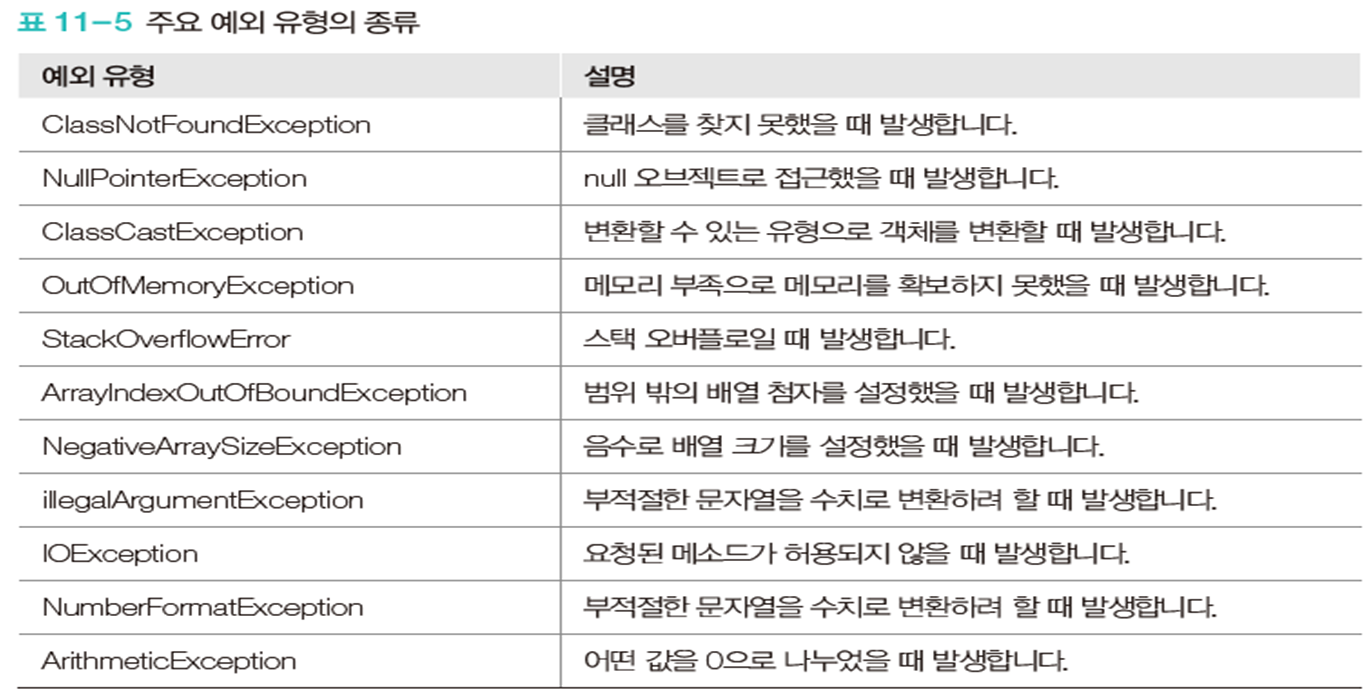
작성법

web.xml
<error-page>
  	<exception-type>java.lang.NullPointerException</exception-type>
  	<location>/error/errorNullPointer.jsp</location>
  </error-page>
웹 브라우저 처리

웹 자체에서 오류를 처리하는 방식이다.
'JSP' 카테고리의 다른 글
| 엔터 누를 때 폼전송 막고 다른 이벤트 호출하기 (0) | 2023.12.28 |
|---|---|
| [JSP] 시큐리티 (0) | 2023.07.10 |
| [JSP] 다국어 처리 (0) | 2023.07.10 |
| [JSP] 유효성 검사 (0) | 2023.07.05 |
| [JSP] 파일 업로드 (0) | 2023.07.05 |

