(1) MariaDB 다운로드
https://mariadb.org/download/?t=mariadb&p=mariadb&r=11.2.0&os=windows&cpu=x86_64&pkg=msi&m=blendbyte
Download MariaDB Server - MariaDB.org
REST API Release Schedule Reporting Bugs … Continue reading "Download MariaDB Server"
mariadb.org

다운로드 클릭
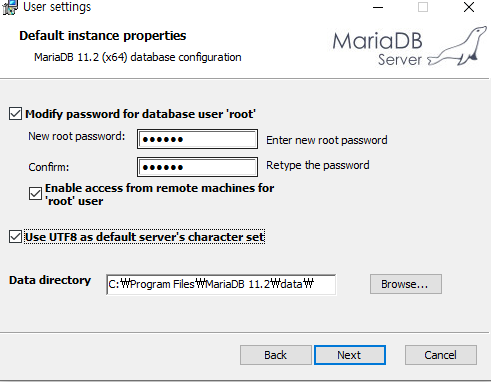
Enable access from remote machines for 'root' user
Use UTF8 as default server's character set 둘 다 체크!!!
사진은 없지만 포트 번호를 3304로 설정해 주었다.!
*** 기본 포트 번호들 ***
MySQL 3306
Oracle 1521
Apache Tomcat 8080
(2) HeidiSQL 다운로드
https://www.heidisql.com/download.php
Download HeidiSQL
Ads were blocked - no problem. But keep in mind that developing HeidiSQL, user support and hosting takes time and money. You may want to send a donation instead. Download HeidiSQL 12.5, released on 08 May 2023 Please disable your adblocker and reload the p
www.heidisql.com
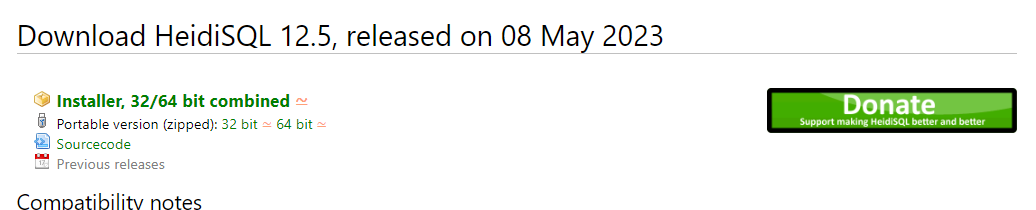
installer, 32/64 bit combined 클릭 후 다운로드
설치 후 실행한 뒤 신규 버튼을 눌러 세션 관리자를 추가해준다
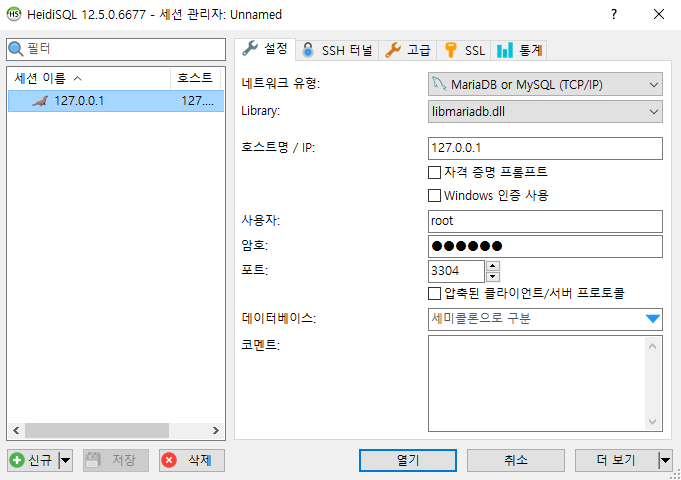
호스트명은 127.0.0.1 (localhost)로 해주고
암호는 MariaDB 설치 시 설정한 암호로,
포트도 MariaDB 설치 시 설정한 포트번호로 지정한 후 세션을 만들어준다.
좌측 물개 그림에 세션 이름이 Unnamed로 되어있을 텐데, 위와 같이 바꿔준다.
쿼리 문에서 CREATE DATABASE PYTHON; 을 실행시켜주면,
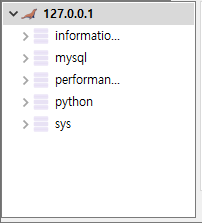
처럼 PYTHON DB가 만들어 지고 이것을 클릭 한 뒤 create table을 통해 이용하면 된다.
(3) MariaDB eclipse python에 연결하기
명령 프롬포트(cmd) 창을 열어 다음 문장을 실행한다
설치가 완료되면,
py 파일을 하나 만들어 다음 코드를 작성한다.\
pip install mysql-connector-python mysql-connector
import mysql.connector

# MySQL 연결 설정
config = {
    'user': '<사용자 이름>',
    'password': '<비밀번호>',
    'host': '<호스트>',
    'database': '<데이터베이스>',
    'raise_on_warnings': True
}

# MySQL 연결
cnx = mysql.connector.connect(**config)

# 연결 확인
if cnx.is_connected():
    print('MySQL에 연결되었습니다.')
    cnx.close()
config에 작성했던 값들을 입력하면 된다.
**쿼리문 실행해보기
미리 MariaDB에 EMP라는 테이블을 만들어논 상태고, select문을 실행해보려면
#select e_id, e_name, gen, addr from emp;
# pip install할 때 mysql 라이브러리를 깔아서 하자\
import mysql.connector

# MariaDB 연결 설정
config = {
    'user': 'root',
    'password': 'python',
    'host': '127.0.0.1',
    'database': 'python',
    'port': 3304,
    'raise_on_warnings': True
}

# MariaDB 연결
cnx = mysql.connector.connect(**config)

# 연결 확인
if cnx.is_connected():
    print('MariaDB에 연결되었습니다.')
    #cnx.close()
    cursor = cnx.cursor()


    # 쿼리문 실행
    query = "SELECT e_id, e_name, gen, addr FROM emp"
    cursor.execute(query)

    # 결과 가져오기
    rows = cursor.fetchall()
    for row in rows:
        print(row)

    # 커서와 연결 닫기
    cursor.close()
    cnx.close()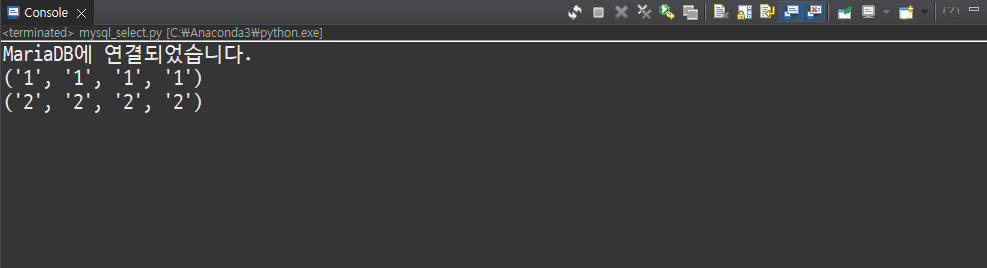
console 창에 잘 출력되는 것을 확인할 수 있다.
'Python' 카테고리의 다른 글
| [DJANGO] MARIA DB 연결(2) - UPDATE(MODIFY) (0) | 2023.07.06 |
|---|---|
| [DJANGO] MARIA DB 연결(1) - SELECT (0) | 2023.07.06 |
| [QT] 오목 게임 (0) | 2023.07.03 |
| [QT] 야구 게임 (0) | 2023.06.29 |
| [QT] 별찍기 (0) | 2023.06.29 |


