dao_emp.py
import pymysql
class DaoEmp:
    def __init__(self):
        self.conn = pymysql.connect(host='127.0.0.1', user='root', password='python',
                           db='python',port=3304, charset='utf8')
        self.curs = self.conn.cursor(pymysql.cursors.DictCursor)

    def selectList(self):
        sql = """
        select
        E_ID, E_NAME, GEN, ADDR
        from emp
        ORDER BY CAST(E_ID AS INTEGER)
        """
        self.curs.execute(sql)
        list = self.curs.fetchall()
        return list

    def selectOne(self,e_id):
        sql = f"""
        select
            E_ID, E_NAME, GEN, ADDR
        FROM EMP
        WHERE
            E_ID = '{e_id}'
        """
        self.curs.execute(sql)
        emp = self.curs.fetchall()
        return emp[0]


    def __del__(self):
        self.curs.close()
        self.conn.close()
urls.py
from django.contrib import admin
from django.urls import path
from HELLO_EMP import views
urlpatterns = [
    path('admin/', admin.site.urls),
    path('',views.emp_list),
    path('emp_list',views.emp_list),
    path('emp_detail',views.emp_detail),
]
views.py
from django.shortcuts import render
import pymysql
from HELLO_EMP.dao_emp import DaoEmp
from django.views.decorators.csrf import csrf_exempt

def emp_list(request):
    de = DaoEmp()
    emps = de.selectList()
    return render(request, 'emp_list.html', {'emps' : emps })

def emp_detail(request):
    de = DaoEmp()
    e_id = request.GET.get('e_id')
    emp = de.selectOne(e_id)
    return render(request, 'emp_detail.html', {'emp' : emp})
emp_list.html
<!DOCTYPE html>
<html>
<head>
<meta charset="UTF-8">
<title>Insert title here</title>
<script>
function fn_add(){
	location.href = "emp_add";
}
</script>
</head>
<body>
EMP_LIST
<table border="1">
	<tr>
		<th>사번</th>
		<th>이름</th>
		<th>성별</th>
		<th>주소</th>
	</tr>
	{% for e in emps %}
	<tr>
		<td><a href="emp_detail?e_id={{e.E_ID}}">{{e.E_ID}}</a></td>
		<td>{{e.E_NAME}}</td>
		<td>{{e.GEN}}</td>
		<td>{{e.ADDR}}</td>
	</tr>
	{% endfor %}
</table>
<br/>
<input type="button" value="추가" onclick="fn_add()"/>
</body>
</html>
emp_detail.html
<!DOCTYPE html>
<html>
<head>
<meta charset="UTF-8">
<title>Insert title here</title>
<script>
function fn_mod(){
	location.href = "emp_mod?e_id={{emp.E_ID}}";
}

function fn_del(){
	location.href = "emp_del?e_id={{emp.E_ID}}";
}
</script>
</head>
<body>
EMP_DETAIL
<table border="1">
	<tr>
		<th>사번</th>
		<td>{{emp.E_ID}}</td>
	</tr>
	<tr>
		<th>이름</th>
		<td>{{emp.E_NAME}}</td>
	</tr>
	<tr>
		<th>성별</th>
		<td>{{emp.GEN}}</td>
	</tr>
	<tr>
		<th>주소</th>
		<td>{{emp.ADDR}}</td>
	</tr>
	<tr>
		<td colspan="2">
			<input type="button" value="수정" onclick= "fn_mod()"/>
			<input type="button" value="삭제" onclick= "fn_del()"/>
		</td>
	</tr>


</body>
</html>
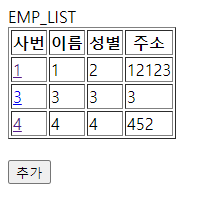
실행화면1 - EMP_LIST
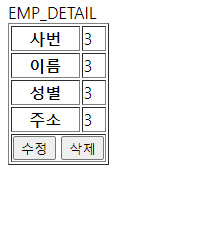
실행화면2 - EMP_DETAIL
'Python' 카테고리의 다른 글
| [DJANGO] MARIA DB 연결(3) - DELETE (0) | 2023.07.06 |
|---|---|
| [DJANGO] MARIA DB 연결(2) - UPDATE(MODIFY) (0) | 2023.07.06 |
| [MariaDB] MariaDB, HeidiSQL 이용해 python과 연결하기 (0) | 2023.07.03 |
| [QT] 오목 게임 (0) | 2023.07.03 |
| [QT] 야구 게임 (0) | 2023.06.29 |


